


AaronDC8402
-
Posts
216 -
Joined
-
Last visited
Content Type
Profiles
Forums
Blogs
Gallery
Downloads
Events
Store
Everything posted by AaronDC8402
-
Our 201 has the HP Plus STC for the 10:1 pistons. All of our documentation shows the hp rating as 210 instead of the 225. Not sure what the difference could be, but it's the same company name and sounds like the same modifications. We've got over 1500 hours on the engine with repeated good oil analysis and performance. Cylinders all run about 360 degrees F at 2500/25" with the cowl flaps closed completely, so no noticeable issues with heat. We bought our plane with the conversion, so I can't say how noticeable the power increase is. I've ridden in another J and a F without this STC, and didn't see any dramatic difference compared to our STC'ed plane. If there's a difference it seems to be that our J climbs out better than the J and F that I can compare it to.
-
Garmin Pilot Full TIS-B Traffic and Ownship Detection
AaronDC8402 replied to AaronDC8402's topic in Avionics/Panel Discussion
Another update. Finally got the plane up to altitude yesterday with the new GDL in it. I'm now getting full TIS-B traffic. Everything is working as expected. Conclusion: The baro sensor in the GDL had failed. The discrepancy between the baro alt and geometric alt (GPS) caused the issues I was having.

- 32 replies
-
- 3
-

-
- garmin
- garmin pilot
- (and 2 more)
-
Garmin Pilot Full TIS-B Traffic and Ownship Detection
AaronDC8402 replied to AaronDC8402's topic in Avionics/Panel Discussion
The new GDL came in last week. Tonight, I finally got to go fly around with it. The ownship detection is working correctly, and other aircraft's relative altitudes are reporting correctly. Unfortunately, I didn't pick up any ground stations (probably due to flying low - sightseeing). Hopefully, once I'm flying at altitude, the TIS-B traffic starts showing up too. -
Have you read any specific mention of issues after the v2.60 firmware? Ours has been great with v2.60 and the previous version as well. I don't hesitate to use it in IMC any more than a mechanical vacuum unit. We've put about 20 hours on ours.
-
Garmin Pilot Full TIS-B Traffic and Ownship Detection
AaronDC8402 replied to AaronDC8402's topic in Avionics/Panel Discussion
I was still under warranty for the GDL39, so Garmin issued a RMA. I'm expecting a new GDL in about a week. Hopefully that fixes everything.- 32 replies
-
- 2
-
-
- garmin
- garmin pilot
- (and 2 more)
-
Garmin Pilot Full TIS-B Traffic and Ownship Detection
AaronDC8402 replied to AaronDC8402's topic in Avionics/Panel Discussion
Finally made a little headway with Garmin on my issue. I've been communicating via email with Garmin tech support, and I've also tried calling a couple of times. The guy I've been emailing with basically gave up on me, and suggested I take up the issue with an avionics shop. After getting that email, I called again. Now that I know my specific issue (altitude reference for traffic display not correct), Garmin phone support was much more helpful. I didn't have the GDL with me when I called, but the guy suggested that I have a problem with my barometer in the GDL. He told me how to view the pressure altitude that the GDL sees (Connext >> Situational Data >> bottom of the list). I got a chance to check that this morning. Sure enough, it's reporting negative FL201 while on the ground. The GDL has an internal barometer, and it seems to only be used as a reference for traffic display. My temporary work around is to activate the "pressurized cabin" setting. That forces the GDL to use geometric position (GPS) for altitude reference instead of the barometer. The next step is to call Garmin again to figure out if anything can be done about the barometer. I'm not sure if it's faulty or out of calibration.- 32 replies
-
- 1
-
-
- garmin
- garmin pilot
- (and 2 more)
-
The FAA recommends that you keep your transponder in ALT mode any time you're powered on. Instead of adjusting the GND mode timer, I'd suggest changing it so that it starts up in ALT mode by default and stays there any time it's powered on. If I remember it right, the procedure is to press and hold the FUNC button while powering on your avionics switch. When it starts up, you're in configuration mode. There's A LOT of stuff that can be configured. Don't accidentally change any of the important stuff. Garmin recommends an avionics shop make the changes if you have a certified plane. If it's experimental, the pilot can do it.
-
Garmin Pilot Full TIS-B Traffic and Ownship Detection
AaronDC8402 replied to AaronDC8402's topic in Avionics/Panel Discussion
I haven't adjusted that setting at all (at least not intentionally). I do plan to try turning it off and on though on my next flight just to see if it makes any difference. -
Carolina MSC Promotion for all of 2017
AaronDC8402 replied to Bob_Belville's topic in General Mooney Talk
We took 1ZX out to KMRN to let Lynn look it over yesterday. Lynn took some time to look the plane over and show us around his shop. We're due for annual at the end of March, and planning to have him do it. Thanks to MooneySpace for letting us know about the 10% discount. -
Only $600 labor to get one installed in our J. Very straight forward if you can connect it to a WAAS GPS. There is a thread in the Avionics section with a few others reporting their install cost as well.
-
Garmin Pilot Full TIS-B Traffic and Ownship Detection
AaronDC8402 replied to AaronDC8402's topic in Avionics/Panel Discussion
The target it says is 19,500 ft above me IS my aircraft. -
Garmin Pilot Full TIS-B Traffic and Ownship Detection
AaronDC8402 replied to AaronDC8402's topic in Avionics/Panel Discussion
Also meant to mention, we had another (slightly newer) Android tablet in the plane also connected to the GDL. Same result on that tablet. -
Garmin Pilot Full TIS-B Traffic and Ownship Detection
AaronDC8402 replied to AaronDC8402's topic in Avionics/Panel Discussion
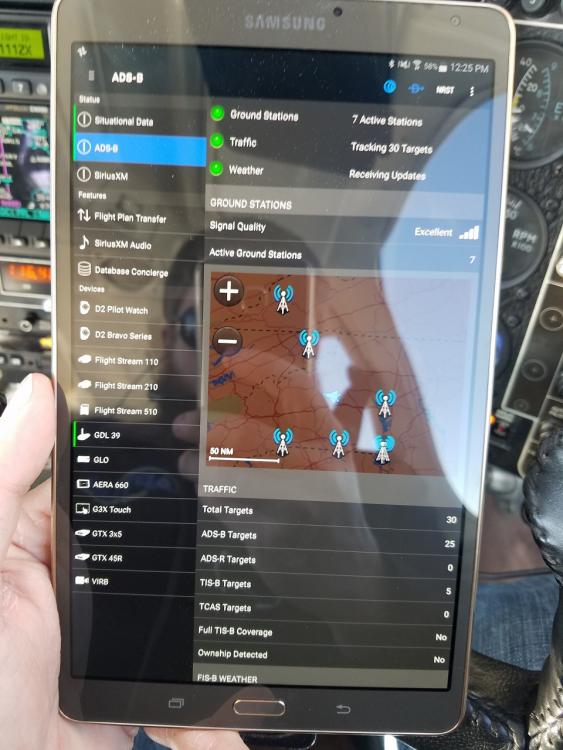
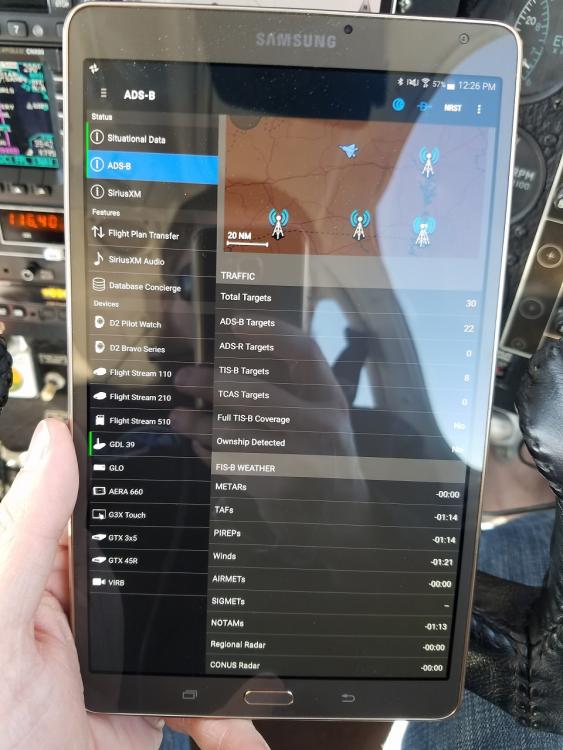
I failed at taking proper screen captures from the tablet. Instead, I took a picture with my phone. Same end result, I guess. Sure looks to me like the GDL is picking up ground stations, and the GDL seems to be talking to the tablet correctly. Pilot is reporting our plane as a traffic target. Notice that it's reporting 1ZX's altitude as +195 (19,500 ft above) relative to wherever Garmin Pilot thinks it is. Knowing that ownship detection algorithm is based on detecting a target within a certain distance (position and altitude), I think the issue might be the altitude discrepancy. Even though I'm reporting UAT in capability, the returned "hockey puck" is only for 3500 ft above and below. If Pilot thinks were 15,000 ft below sea level, nothing will ever get reported back. I'll send this stuff back to the Garmin tech support guy that I've been emailing with as well. Maybe he can figure something out from here. I don't know where the altitude reference comes from. Garmin pilot shows GPS altitude reasonably correct (which should be coming from the GDL's GPS). The GTX is reporting correct altitude. Maybe it's just a glitch in the Garmin Pilot app.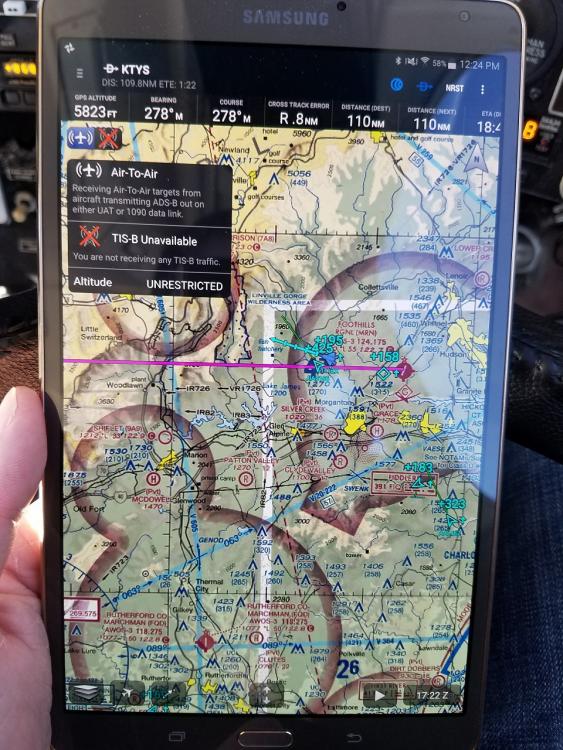
-
I've watched some of the guys videos. Well done videos, but there are other pilot bloggers I like more. I always assumed the Mooney was a rental plane since most of his videos are in the 172. I've heard him say that his dad owns the 172, but never heard him say that about the Mooney. Who would ever choose to fly the 172 over a Mooney if they were both equally available?
-
Garmin Pilot Full TIS-B Traffic and Ownship Detection
AaronDC8402 replied to AaronDC8402's topic in Avionics/Panel Discussion
It shows connection to ground stations, but no ownship detection or TIS-B. I'll take some screen captures the next time I'm flying. Should be tomorrow. -
Garmin Pilot Full TIS-B Traffic and Ownship Detection
AaronDC8402 replied to AaronDC8402's topic in Avionics/Panel Discussion
The full report is attached to this message. Let me know if you see anything meaningful. It is mostly over my head. The first test I ran showed "1090" as In capability. After changing the configuration of the 330ES, I ran the report and got what is attached showing DUAL in. I am getting FIS-B weather. I see some aircraft, but it doesn't seem to be the full TIS-B picture. It seems to be functioning exactly as it did before we got the ADSB install. The 182 that I used to fly frequently is ADSB-out compliant as well. When I would fly it, I would get the antenna icon illuminated and see TIS-B traffic. I have also wondered if the GDL or Pilot have somehow latched onto that plane, and it's looking only for that plane as ownship. I feel like I'm grasping at straws with that thought. Thanks everyone for all the help so far! PAPR_20170123_A0323F_33477743.pdf -
Garmin Pilot Full TIS-B Traffic and Ownship Detection
AaronDC8402 replied to AaronDC8402's topic in Avionics/Panel Discussion
GDL 39's connection status shows connected, and I'm showing connected to multiple ground stations. The more I'm reading up on it, the more I'm thinking something isn't triggering the ground stations to send the TIS-B info. Per Garmin's request, I called my installer (Gann Aviation) this morning. We hired them to install a 330ES. We did NOT hire them to install a GDL39, so understandably they are a little at a loss for help. The 330ES seems to function, Garmin Pilot is where the problem shows up. Ron at Gann is going to call his Garmin rep to query him on the situation. Since this is a certified aircraft, Garmin tech support refuses to discuss the 330ES configuration settings with me. -
Garmin Pilot Full TIS-B Traffic and Ownship Detection
AaronDC8402 replied to AaronDC8402's topic in Avionics/Panel Discussion
Jack, are you on Apple or Android? -
Garmin Pilot Full TIS-B Traffic and Ownship Detection
AaronDC8402 replied to AaronDC8402's topic in Avionics/Panel Discussion
I could have mentioned a little about that. I fly in/out of a class C airport (KTYS). Not the busiest "C" airport, but there should be some TIS-B traffic showing up. At cruise the other day, I was showing 3 active stations at one time. Your question about the stations not knowing that I'm UAT in capable. I think I've addressed that, but not 100% sure. Below is part of the report that shows In capability as DUAL. The question is, does that fully confirm everything is set up right on the transponder? Or could there be something else configured wrong on the ES?
-
Garmin Pilot Full TIS-B Traffic and Ownship Detection
AaronDC8402 replied to AaronDC8402's topic in Avionics/Panel Discussion
Oh, and since you guys/gals seem to like seeing various tablet mount solutions, I'll share mine. It's slightly relevant, although it is an old picture. This is prior to the ES, G5, EDM830 install.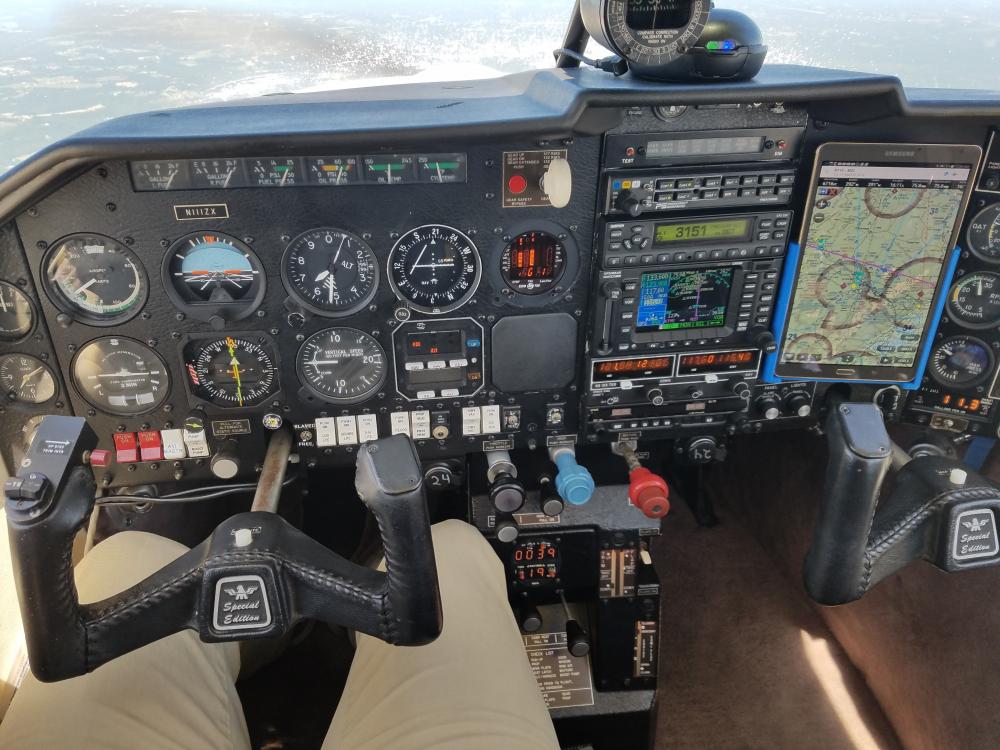
-
We recently had a GTX 330ES installed in our Mooney to meet the upcoming ADS-B Out requirement. We also have a GDL39 for ADS-B In info. I expected now that we're ADS-B compliant that I would start receiving more info from the ground stations. That has not happened, and I'm wondering if anyone has any suggestions or experience on the topic. To recap, we have GTX 330ES (configured to report Dual in capability) GDL 39 3D Garmin Pilot (running on Samsung Tab S) GNS 480 The top left corner of the map page shows 2 icons related to incoming info on the GDL. Air to Air shows correctly. The antenna icon shows a red X. In the ADSB settings page, it reports "Full TIS-B Traffic" as "No". On "Ownship detected" there is also a "No". Garmin tech support has been somewhat helpful by pointing out that the ES needs to report the UAT In capability to the stations. That is now set correctly (I think), but still no TIS-B or ownship. They have offered no suggestions to confirm that I have Pilot and the GDL set up correctly. They are mostly pointing fingers at the ES, and suggesting I ask a Garmin dealer about the issue. I did have Full TIS-B and ownship detected about a year ago when I was regularly flying a ADS-B compliant 182.
-
Also, the sectionals will typically list times and altitudes that MOA's are active. For everywhere I've flown so far, staying clear of them has been the easiest solution for me. It's never added more than a couple minutes to a trip.
-
The fact that the plane is not making book speeds (assuming the OP is reporting TAS and not IAS) and the plane is not making 2700 rpm on roll-out, I'm guessing it's an engine power issue. You mentioned having the JPI 700. When you start to lean for cruise, do you see any of your EGT's climb earlier than the others. We had a slightly similar issue at one point with our plane. We ended up with one mostly blocked and one partially blocked fuel injectors. Cleaned them up, and everything went back to normal.
-
Filing IFR backup when flying VFR
AaronDC8402 replied to Browncbr1's topic in Miscellaneous Aviation Talk
My understanding (and experience) is this. In the situation you described, you're filing IFR just to get your plane/pilot info into the system. I expect there's about zero chance you'll hear, "cleared as filed" once your part way to destination. You'll probably hear, "cleared via radar vectors to ....." or "present position direct to ....". You can accomplish the same backup plan by doing nothing, launching off VFR, and requesting IFR en route. If you choose that option, you'll be required to rattle off all of the info that normally gets put into a flight plan form over the frequency. Not too bad, but less convenient than if they have all your info on file. In the southeast, I've never been given and inconvenient route for where I'm going. Typically direct to anywhere. For that reason, I just file and fly IFR any time there's a question about getting there VFR. Assuming you're not held for release, it's typically easier (safer, maybe) to launch IFR and cancel when you get vectored in a way you don't like (assuming VFR conditions). -
Electronic AI's get their orientation from what is essentially a solid state electrical gyro. It's a chip on a circuit board. The pitot/static and GPS are supplementary to the device's operation. The Aspen requires the pitot/static, or it goes red X's. The G5 still functions without the pitot/static or GPS. They're just supplemental to the calculation that results in what you see on the display. I don't think the pitot/static and GPS are the primary way any electric AI calculates it's orientation in space.


