


rklems
-
Posts
37 -
Joined
-
Last visited
Content Type
Profiles
Forums
Blogs
Gallery
Downloads
Events
Store
Everything posted by rklems
-
From other posts, looks like you have a G3X w/EIS. In a factory setup, the sense lines to the annunciator come off terminals that are piggybacked on the stud at the fuel gauge where the fuel sender comes in. The senders in a factory setup are resistive, I don't know for sure it's the same, but going to assume its the same as on a K, where low resistance to high resistance goes low fuel to high fuel. Is your EIS installation new or have you had it a while? There are a lot of guesses/assumptions here, but if you still have the factory senders (as opposed to CiES frequency based senders, in which case I'd say if you are getting a low fuel indication, then the wire for the annunciator was left in and is getting shorted to ground somewhere, as I don't think there is another means to drive that sense line with a CiES sender), there can be a couple different reasons why this might be behaving differently now. Resistive probes are basically a wound wire resistor with a finger that rides up and down that wound wire, varying the resistance. Over time this fine wound wire can wear out, break, develop corrosion, etc. This can cause poor indications, jumpiness, etc. You aren't mentioning any strangeness in the display of quantity, but the G3X uses some smoothing on the data, so that the quantities don't jump around significantly as you bank, encounter turbulence, etc. The annunciator circuit also provides some analog smoothing, so it needs to see a certain low resistance value for a number of seconds before the circuit will actually start to trigger the low fuel annunciation. In theory, over a period of time, both the indication and the annunciation should be indicating a lower fuel quantity if there was a significant departure in the resistance level of the sender. If this is an older G3X install, and thereby used a GEA24 vs GEA24B EIS interface, then there are a couple other reasons this could be occurring. There is an AD for resistive interfaces to the GEA24 EIS interface, and the AD requires reconfiguring the resistive senders through some parallel resistors and resetting the configuration from 0-620 ohm resistive to 0-5V. This AD was effective March 2022, so likely would have been completed previously, but ADs have been missed before, so it's possible this was recently done (and would have likely impacted the low fuel indications, depending on how exactly this was interfaced between the senders, the G3X and the annunciator)? It seems like you recently had an annual (saw the thread about the busted gear switch), so perhaps this AD just got done, or something got touched when the gear switch was replaced, or a sender is starting to vary in resistance a bit, or the annunciator circuit just drifted over time and needs to be recalibrated.
-
Keep Moritz gauges with GI275 EIS?
rklems replied to AspiringOwner's topic in Modern Mooney Discussion
As @jetdriven notes, it is an STC requirement. The specific verbiage from the STC install manual that prohibits it is in 3.2.3 "4. No indication/parameter on the EIS display(s) can be duplicated by any other installed indicator that is not connected to the GEA." Duplicating all that is just more failure points and additional weight. If this is a huge dealbreaker for you, there are other primary EIS systems that don't have this prohibition on duplicating indications. However, I really don't recommend going down that path. -
Pretty sure it’s from the weather overlay. When the data is spotty/low resolution for a particular area, I’ve seen that weird banding before.
- 1 reply
-
- 1
-

-
Note: this is assuming factory connections, your M20J looks pretty upgraded, so there is always a chance something was modified on how they are connected. There are 2 signals... the low voltage is sensed from the power input to the entire annunciator, pin 1 at the annunciator connector (21WT02C22), which is powered from the 2A annunciator breaker (after passing through the CPC at the back of the breaker panel). The high voltage signal is pin 11 (21WA02D22) which gets its signal from the voltage regulator (also after passing through the CPC at the back of breaker panel). You can pull the connector off the back of the annunciator panel and check what you have on both of those pins. Also, this is referenced to the ground at pin 15 (21WT03C22).
- 1 reply
-
- 1
-

-
GTN650 + G5 + KFC150 : G5 does not function on NAV Mode
rklems replied to N177MC's topic in Avionics/Panel Discussion
I have a guess here... this is a somewhat common installation failure in the G5 replacing a KCS55/KI525 King system. The nav tracking comes from the GTN, which was usually wired through the KI525 and then to the KC19X head. Since the G5 installation manuals do not show this connection, more inexperienced installers do not reroute the nav signals directly from the GTN to the KC19X. The G5+GAD29D only provides course and heading error signals to the KC19X, it doesn't generate any nav signals (which is why there is the limitation that a G5 can be interfaced to only one navigator when installed with a 3rd party autopilot). So the analog +L/+R, +Up/+Down and +/- GS Flag signals must be connected from the GTN directly to the KC19X head. Using Nav/Apr is of course the only way to do a coupled approach with the KFC, you can navigate laterally with GPSS, but it doesn't go in to higher tracking mode, nor will it be able to couple vertically.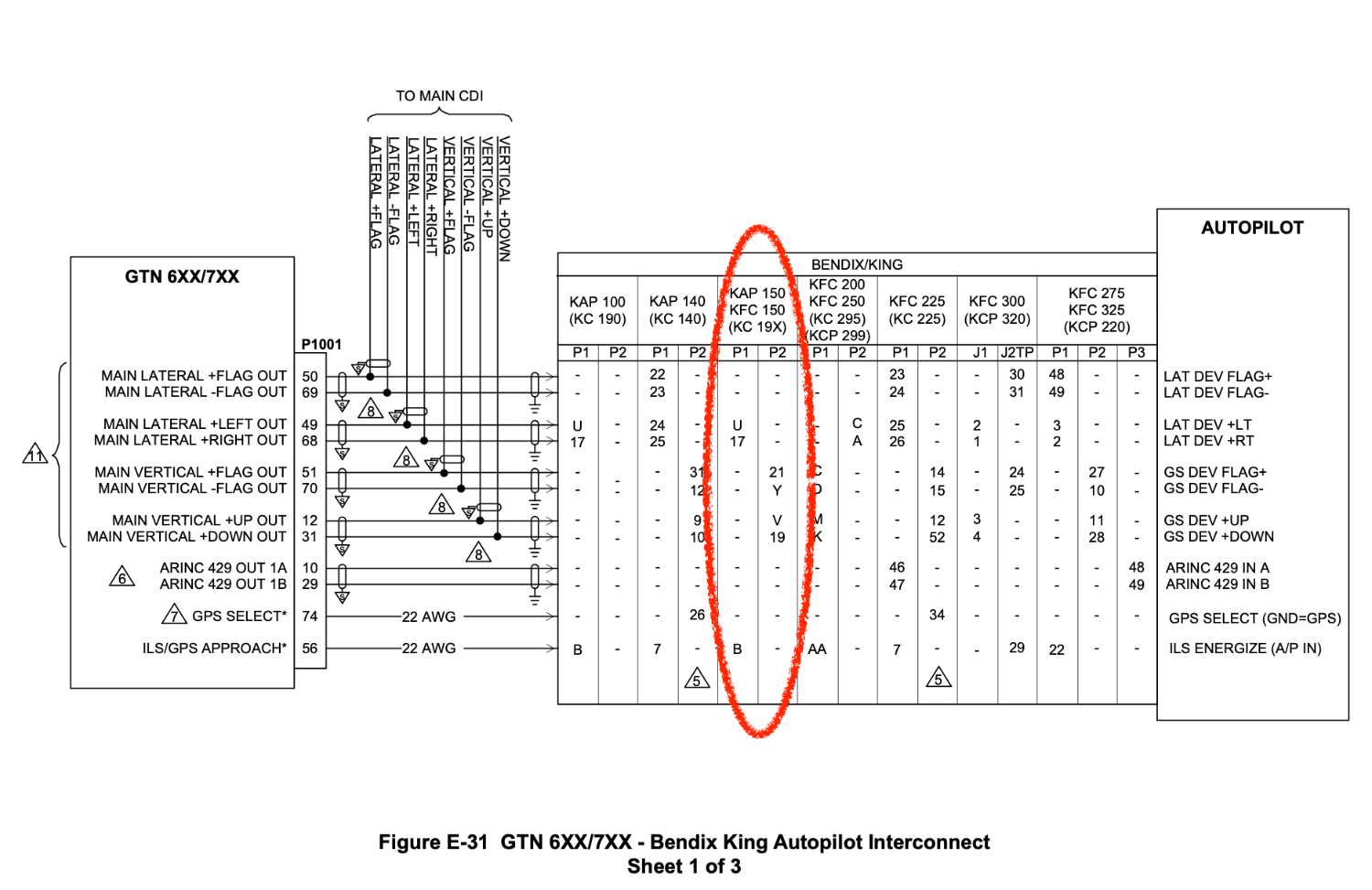

-
ADS-B for 1984 M20J with original equipment
rklems replied to Beard's topic in Modern Mooney Discussion
There are a lot of good options, new and used, but I think I'd start with, what are your plans with the panel longer term? I wouldn't spend time and money putting something in, that you might then end up yanking out in a couple years time if you are planning larger panel upgrades. A GDL82 (not sold anymore by Garmin, but available used) can be interfaced easily with your existing transponder, and has it's own WAAS position source, but is a bit more invasive of an install than just tossing a tail beacon or wing tip device on, and I'd only recommend that option if your current transponder is still in good shape, and you didn't want to go with a nav-light based solution. A GDL88+GTX330 can be had fairly inexpensively on the used market, and would get you ADS-B in/out (UAT out), but you'd need something in the panel to display the ADS-B in, if you don't have anything in the panel and wanted it to only display on a portable device, you'd also need to add a Flightstream 210, and would need to get a GDL88 with the position source, assuming you don't have a WAAS navigator already (if you are all original equipment, I'm guessing you don't!). The install would also be more involved as you would have a panel mount box and a remote mount box and the wiring between. There are two options that are mostly all in one, and should likely fit in the same-ish space as your existing transponder (they are a bit taller) would be a GTX 345 or a GNX375. A GTX345 w/WAAS will do in and out, stream to your iPad or other portable without any additional equipment and provide its own position source. Other than adding the WAAS antenna, the install wouldn't be terribly involved, it should mount in the same space as the existing transponder. This will also interface well with any future panel modifications, like adding a GPS navigator etc. The GNX375 would give you the same in/out as the GTX345, as well as being a WAAS position source, it is also a WAAS navigator. You'd need somewhere to install an indicator, and it's a little more involved of an installation, but it's probably the most forward looking, and would open up the world of GPS navigation to your panel. Something like a stratus ESG also works for easy ADS-B out with a modern transponder, but it can only use its own internal WAAS position source. The drawback of that is if you ever were to add a GPS navigator to the panel, you couldn't just use the antenna you installed for the stratus for the navigator, and then send position source over serial from the navigator to the ESG, so instead you have to add a second antenna. Plus it doesn't get you in, other than through essentially a portable device. The Lynx NGT9000 is another interesting unit, would get you in/out as well as a minimal display for traffic and weather, but their big problem is support these days (L3 has sold them off), and it also doesn't interface completely with all panel mount stuff (some units you might be able to display traffic, but no weather, etc). -
Can you read the part number on the various parts of the isolators? Assuming you have the standard setup (that serial number would have originally used some slightly different mounts than later serials, but later replacements would have theoretically used the same mounts as the later serials), the only spacer that is different is the left front, which would be a J-10931-2 spacer, (should be able to read that in the molded rubber). The manual is pretty clear about the stack up...

-
I wonder if they properly configured the GDL-88 RS-422 Port 2? By default these will be disabled, so needs to be set to Connext Format 1 on the Input and Output for the port. You need the little software app running on a windows laptop and direct USB connection to the GDL 88 to configure it.
-
Ah yeah, the GI 275 <-> GEA sync has gotten me a few times too... seems like they should give a better indication that a sync is occurring and to wait for that to complete. There are a few places in the UI that it puts up an overlay with some animated ... when it's doing the sync, but it doesn't seem to be consistently applied everywhere there is a sync that needs to occur.
-
Agree with @jetdriven they have the wrong k-factor.... Do you know what fuel flow transducer was installed? Sounds like it was new with this EIS install, so they should have had the proper data. If they interfaced it to a factory fuel flow transducer, I believe those are Floscan units.
-
What is your pressure altitude source? Is it a GAE12 attached to the transponder tray, a blind encoder (serial or grey code), or some other air data source? There are many ways to get pressure altitude to the GNS, but the best way to do so is going to depend a lot on what the actual canonical source for the pressure altitude is.