Costa Leite
-
Posts
82 -
Joined
-
Last visited
Content Type
Profiles
Forums
Blogs
Gallery
Downloads
Events
Store
Everything posted by Costa Leite
-
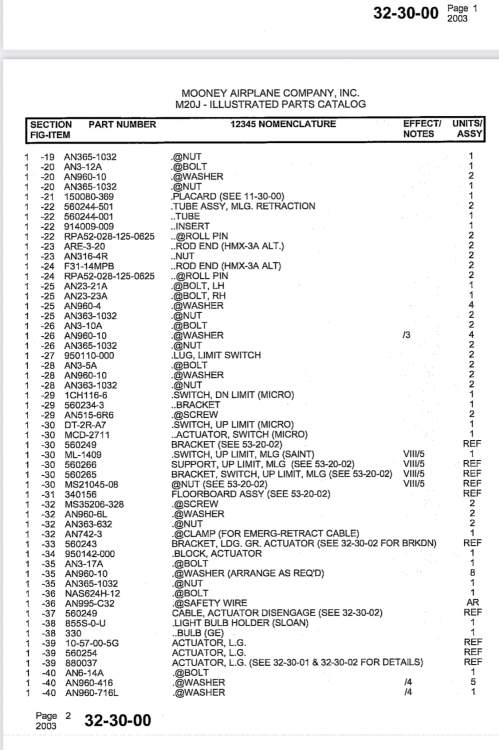
Is it Item Nr 29 & 30 of IPC, right?

-
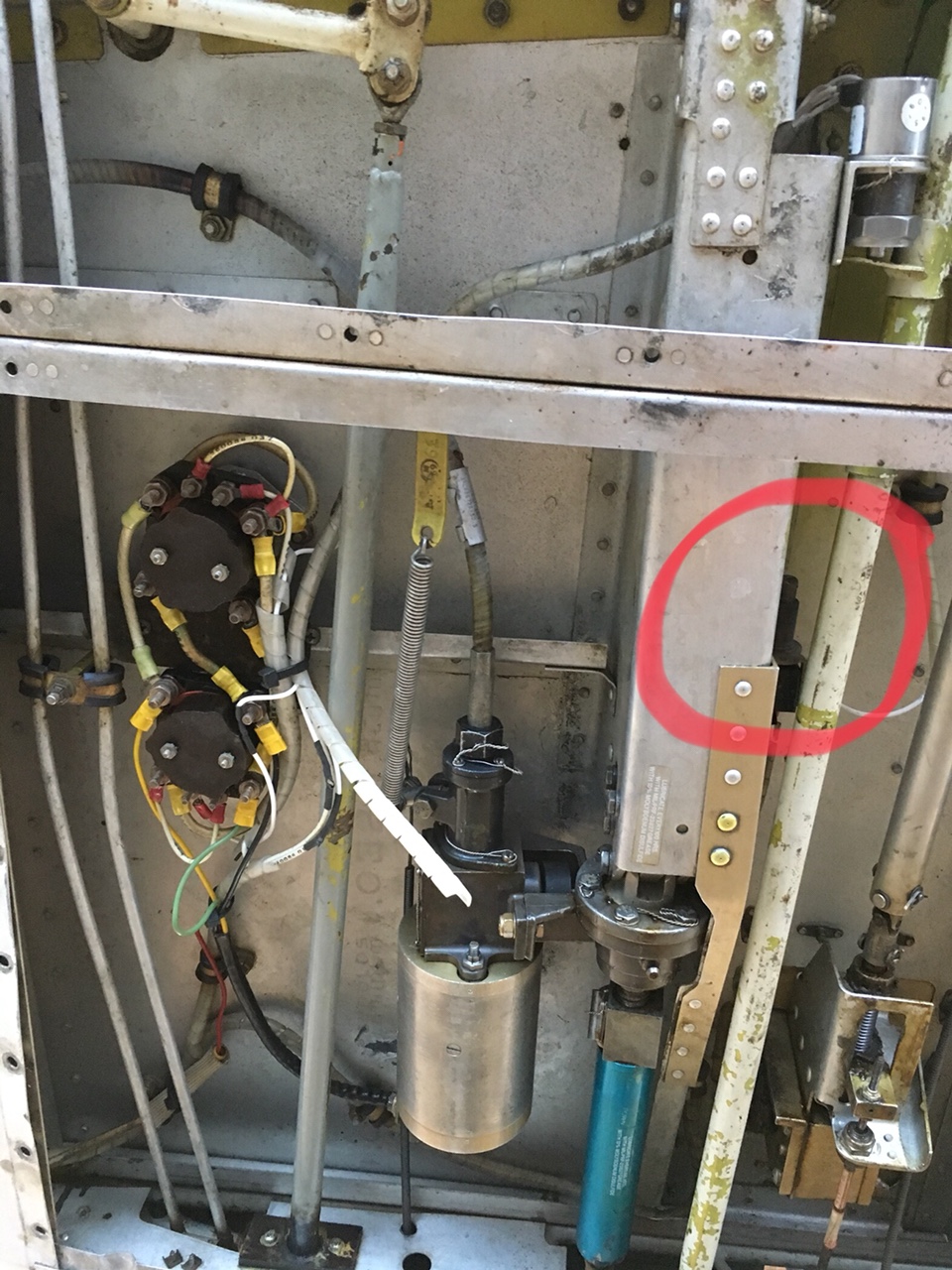
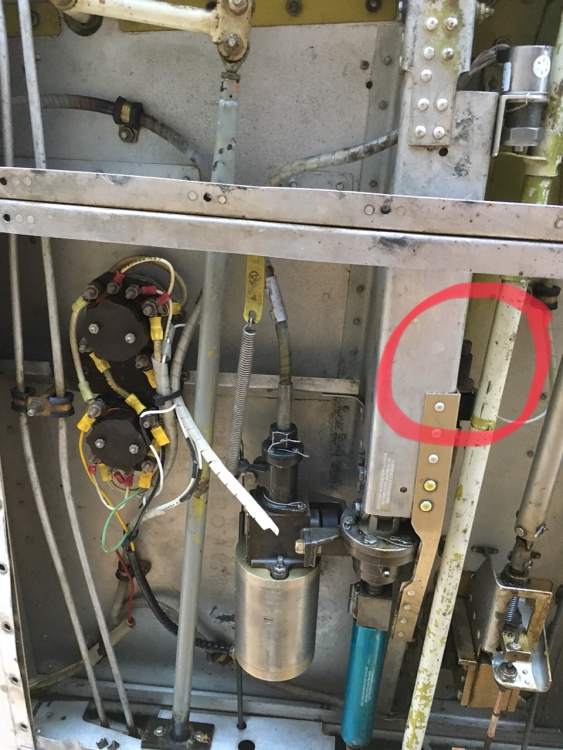
Thanks Ragsd15e, Can you confirm that the switch is the one highlighted in red in the pic in attach?
-
Hi Ragsd15e, Many thanks for your comment. I hope my problem will be that simple. Just to understand a bit more your experience (which seems to be the same of Phill EF comment above) with delayed retracing issues, in any of the ocurrances does the MasterWarningLight iluminated and the GearUnsafe light on AnunciatorPanel iluminated?... ti happened to me on first time, perhaps indicating that the gear stopped at the middle of the retracting process...!?
-
Does anyone have a picture of the limit switches?
-
Thanks PT20J does anyone have the service manual instructions for this gear problem that can share it here? I am trying to get ahead of the problem and study a bit this situation before the maintenance shop gets in
-
Lancecasper, Thanks for the tip, but I clarified on my initial post that the problem wasn't with the emergency latch mechanism, because I dobled checked it in flight when I had this gear problem. I was aware of this situation, and with kids on board it was likely that someone could kick the latch. But that didnt happen. The latch was secure and in place on both occurences.
-
Dear All On last weekend I had a problem retracing the gear of our 1998 M20J Allegro, S/N 24-3429. After take-off on Saturday from home base with full tanks and wife+kids on board, I selected gear up and continued the initial climb… I felt something strange because we weren’t accelerating as usual, but as I was on MTOW I didn’t care too much, but few seconds after, when crossing runway threshold I noticed the Master Warning Light flashing, and then I looked at the Annunciator Panel and saw the red light for Gear Unsafe. I was flying 85kts at the moment and the aircraft wasn’t accelerating too much. I selected flaps up and initiate the standard left turn at level flight. As soon as we accelerated, the gear retracted and all lights gone off. Entering downwind and level flight at pattern altitude, I decided to check the system and cycle the gear (we were around +100kts on ASI), and the gear extended and retracted without any incident, and so I continued the flight. Reaching destination, I lowered the gear and everything was normal and landed without any problem. On the next day, we departure back to home base. On pre-flight I double check visually all 3 gears and everything looked normal. But after take-off I selected gear-up and nothing happened… we were climbing at 80kts with poor acceleration. This time I didn’t get any warning light but the gear was still down according to panel floor indication. I decided to cycle again the gear selector, but nothing happened… and I left the handle at gear-up selection. When I levelled off at pattern altitude, the aircraft accelerated and, around +90kts the gear started to retract normally and without any warning lights. As everything seemed normal I decided to continue flying, and reaching home base, I selected gear-down and gear extended normally, all visual indications were good and I landed without any other issue. I clarify that we have almost new rubber shock discs on all 3 gears. I also clarify that the emergency gear lever was locked in place on both situations. On both occasions I never tried to push the red button of Gear By-pass. According to several topics here on MS related to Gear Retracing problems, this can be caused by: - Problem on the Gear Circuit Breakers (but none CB popped during the last two flights). - Problem on the Gear Relays. - Problem on the Gear Handle selector. - Problem on the Gear Electric Wiring from wheels to gear motor. - Problem on the Gear Limit / Up Switches. - Problem on the Gear Airspeed Safety Switch. I believe this is a problem related to Gear Relay, or Gear Airspeed Safety Switch. Thinking on Airspeed Switch, probably on Saturday I got the Warning Light + Gear Unsafe Light because the Gear started to retract (maybe at a higher Airspeed than normal because of a faulty Gear Airspeed Switch), but somehow the airspeed reduced and the gear stopped retracing, activating the warning lights, and only after new consistent acceleration on downwind the gear continued to retract… is this possible? If it is the Airspeed Switch, I read somewhere that there are two micro-switches on this part, one for the Gear and the other one for airborne flight timer avionics… and if this second microswitch isn’t used on any avionics it can be used to the Gear system to substitute the other faulty microswitch… Is this true? Can anyone help with the troubleshooting? Many thanks in advacne for sharing your knowledge. Fredi
-

GTN 750 Terrain Warning not working
Costa Leite replied to Costa Leite's topic in Avionics/Panel Discussion
Many thanks RMag for the help! I will give feedback later as soon as I get again on board. -
GTN 750 Terrain Warning not working
Costa Leite replied to Costa Leite's topic in Avionics/Panel Discussion
Of course that I am trying to get terrain warnings when flying (very) close terrain or obstacle. Already explained above that on these situations GarminPilot gives the Terrain Warning, but nothing happens on GTN... -
GTN 750 Terrain Warning not working
Costa Leite replied to Costa Leite's topic in Avionics/Panel Discussion
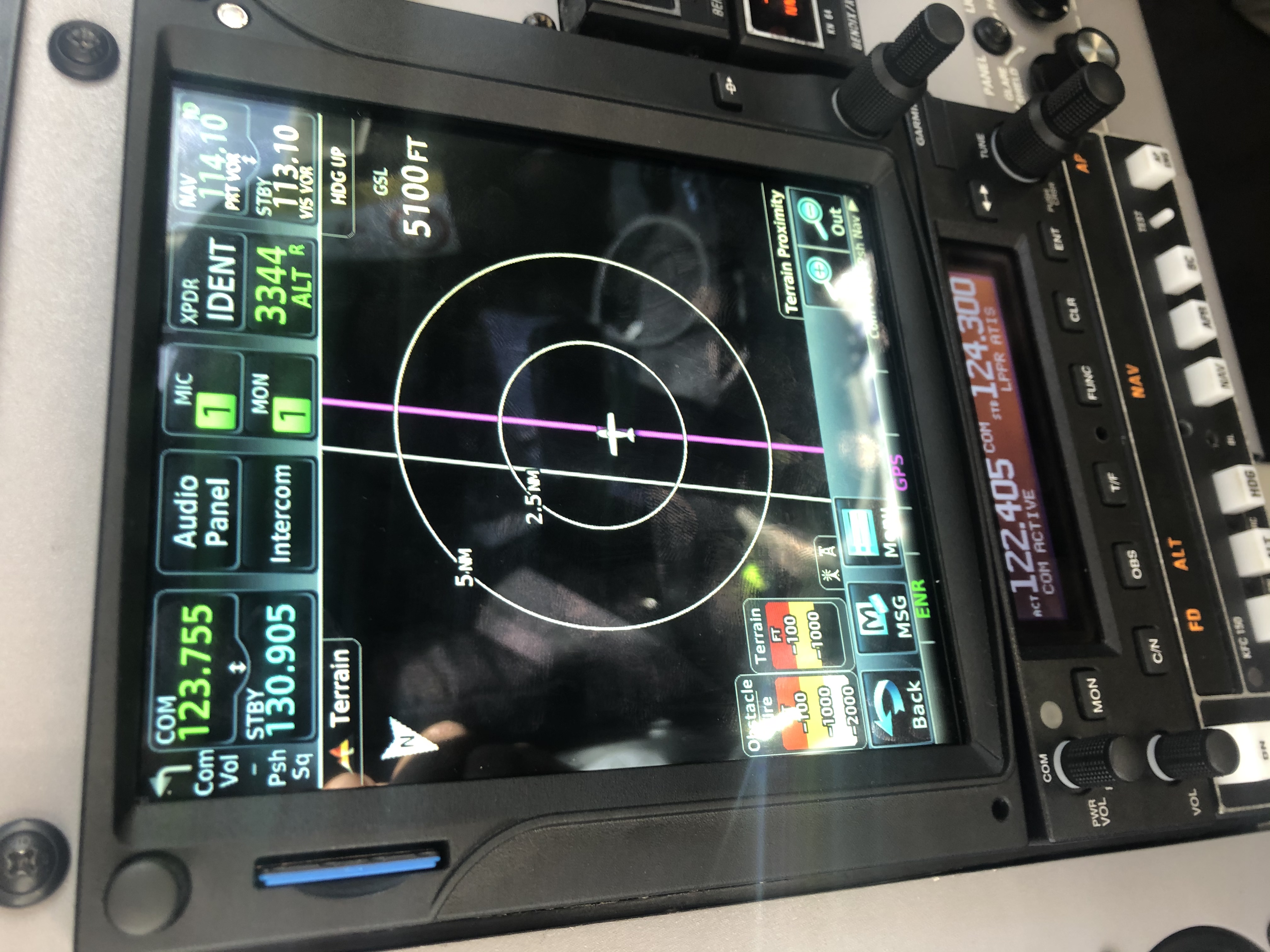
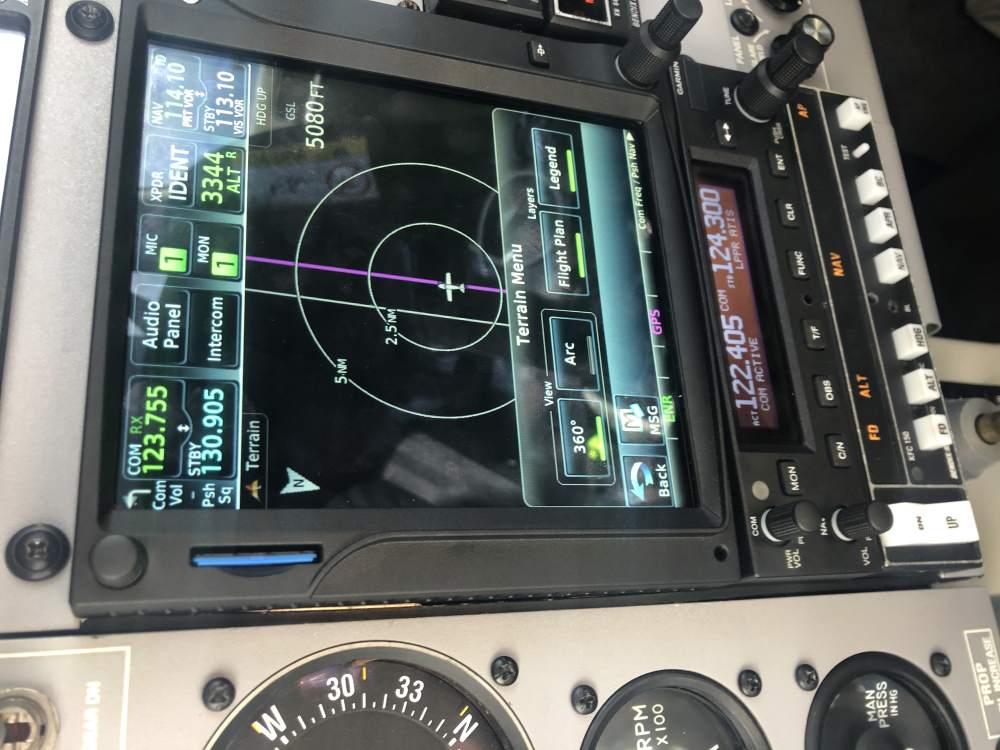
Thanks for all comments. I am almost sure that this is a setup problem and not a alert audio wiring problem because I do receive other audio messages from GTN and, most important, besides not having aural messages for basic Terrain Awareness I don’t receive any Terrain Awareness visual messages on display either as I do receive on iPad on GarminPilot. The GTN750 main software was originally V6.21 and it was upgraded to V6.70 last summer. The picture in attach shows that my GTN options menu on the Terrain page aren’t as they should be according to GTN Pilots Guide, because I believe I should have a temporary Inhibit Terrain Awareness button, but that’s not the case currently. So I am really thinking this is a setup problem and will investigate on Configuration Mode as suggested.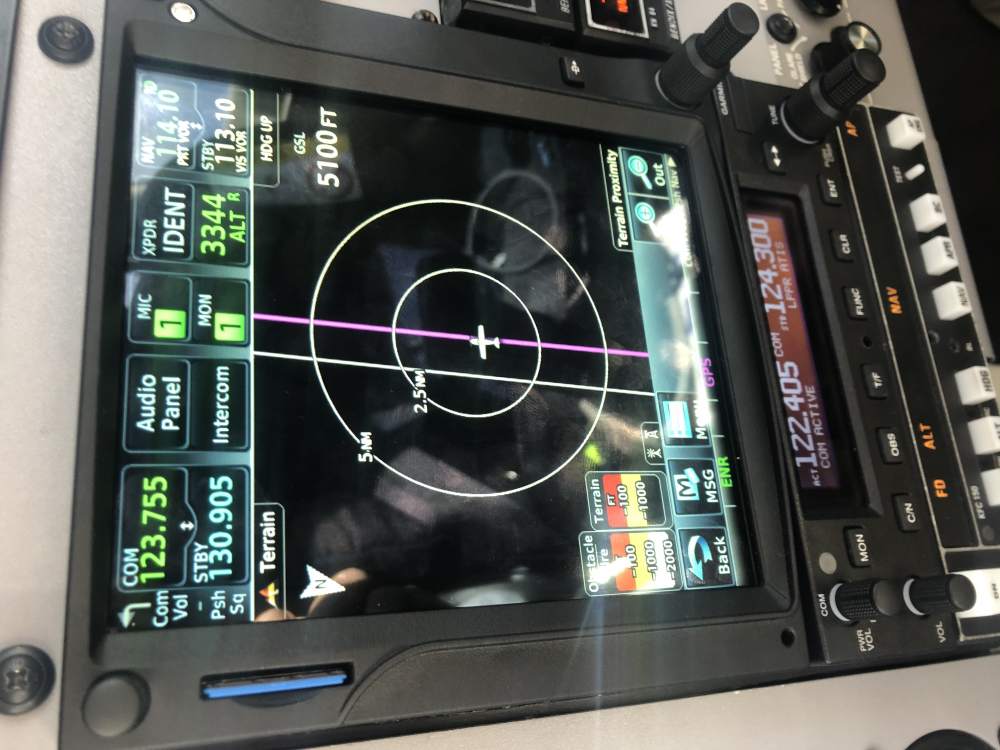
-
GTN 750 Terrain Warning not working
Costa Leite replied to Costa Leite's topic in Avionics/Panel Discussion
I do not receive any message at start up like “Terrain System OK”, neither do I receive any visual warning or aural warning message for terrain or obstacle or GP deviation. But I do receive visual and aural message for traffic warning. So I believe this is not a audio wiring problem from GTN to audiopanel because if it was I wouldn’t get any other aural warning like the traffic warnings call outs, and I would see the visual terrain warning message, right? According to GTN manual, on the Terrain App page, on the setup settings, if the Inhibit is selected it will be automatically disabled on next power up. In my opinion it seems that my GTN has a somehow permanent inhibit terrain warning... is this possible? Where can I check it? -
GTN 750 Terrain Warning not working
Costa Leite replied to Costa Leite's topic in Avionics/Panel Discussion
I am just expecting terrain and obstacle awareness, and not TAWS. I know that I need to buy an optional feature for TAWS-B or TAWS-A, but that’s not what I am looking for. I just want to have basic terrain and obstacle awareness, but I am not having that... I think this is something wrong with the setup -
Dear Mooniacs I recently realized that the GTN 750 in our M20J Allegro has another problem, probably since installation. Only now I noticed that the basic Terrain Awareness System is not working at all, because I never heard the initial message after system self-test on power up "TAWS System OK". And neither I saw or heard any basic Terrain Awareness warning message when we fly close to obstacles or mountain terain. I have a valid terrain and obstacle database, and I do see contours terrain colours overlay, and obstacle colours symbols overlay, on map page or terrain page. But if get close to any terrain or obstacle i don’t receive any warning message, neither visual nor aural. And I do see a Terrain Awareness message on iPad or iPhone when flying close to antenas, etc.. I think I must have any error on my GTN configuration... What kind of information should I try to find on GTN pages to clarify this situation? Anyguides for troubleshooting? Does anyone have any clue on the reason of this situaion, and how to solve it? Many thanks in advance for your help. Cheers Fredi
-
GTN visual approach with KFC 150
Costa Leite replied to Costa Leite's topic in Avionics/Panel Discussion
Dear Mooniacs After a long time, we finally switched the pins from AP to GTN to the correct position, and now the problem is solved! Due to Pandemic we couldn't have done this service before, but now our Allegro is performing RNP LPV app fully automatically with the KFC150 AP. Thanks to all that shared their knowledge! Cheers, Fredi P.S: attached is a video of the aircraft performing a GTN Visual Approach to runway16, during a crosswing day. Sorry for the video quality, but it is only to show the AP going from HDG to APP mode, and them capturing GS fully automatically into a runway without any IFR procedures :-) IMG_3026.mp4 -
Protect Switch on M20J Allegro CB Panel
Costa Leite replied to Costa Leite's topic in Modern Mooney Discussion
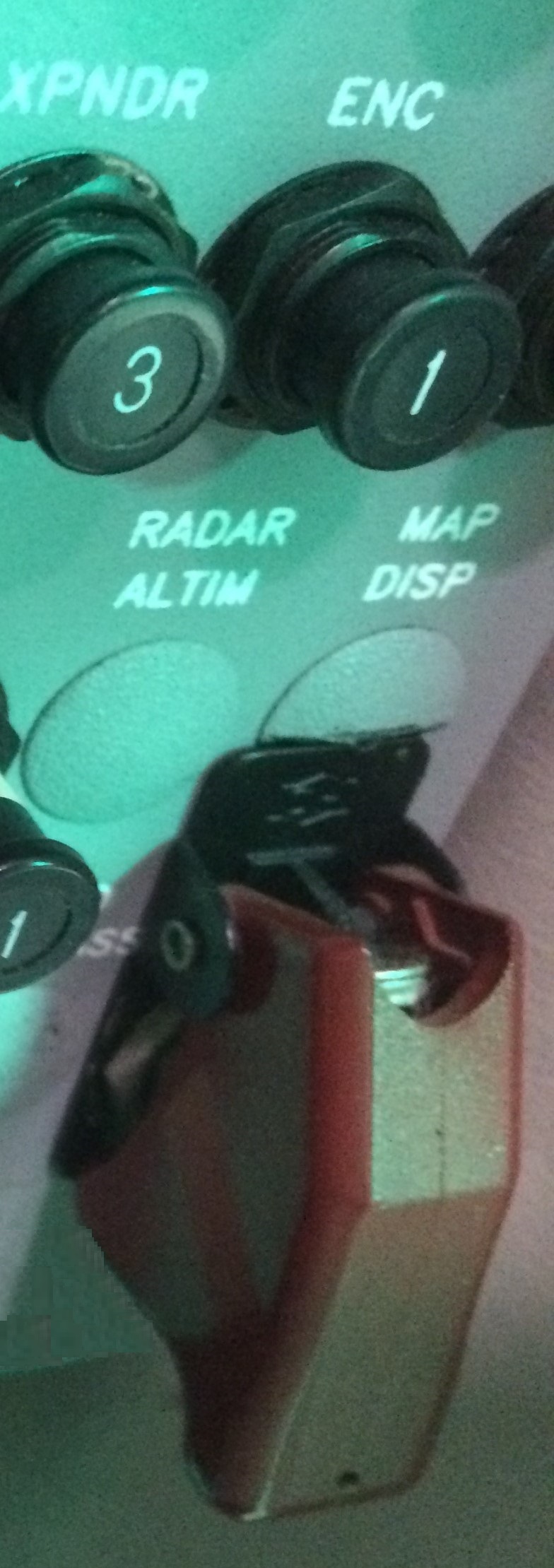
Dear All I contacted Mooney Support early this week asking if they know anything about this switch, and here is Kevin’s reply: “Fredi, I have consulted with our electrical design engineers and there is no data to support that the switch was in place when the aircraft was manufactured at the factory. It would be very interesting to trace the wiring and find out what it is connected to. Sincerely, Kevin Kammer” I already went to the hangar and flipped the Protected Red Switch and confirmed this is a Radio Master Bypass. By coincidence I just saw an UK M20K sale advertisement a few days ago and identified an exact same switch on the K panel (picture below). Hyett6420 also confirmed he has this switch on his M20J and that it is a CAA mandatory installation, which confirmed my guess about the switch been installed on our M20J Allegro right after ferry flight arrival at UK for “G” registration and import paper work conclusion. So, mystery solved! Many thanks to all for your help! Cheers Fredi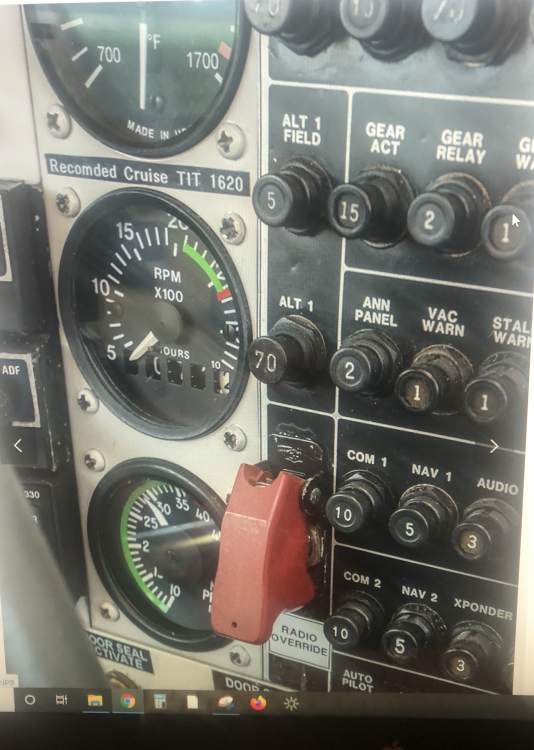
-
Protect Switch on M20J Allegro CB Panel
Costa Leite replied to Costa Leite's topic in Modern Mooney Discussion
Hi, Many thanks for all comments. As already edit on my first post, I clarify that this switch is not labeled. This M20J Allegro (SN 24-3429) was bought at Kerrville and then flew directly to Europe for its only single owner since new till present. A picture from the original panel is attached, and as you can see, since factory this bird had an ELT, but didn’t had any EPIRB. I looked through the Logs and there isn’t any entry regarding this switch. As this J doesn’t take any weapons, I believe the switch is an Avionics Auxiliar Switch as someone told me before and as Greg and Skip are betting, but I want to make sure of this. I will try to turn it on the next day at the hangar and will post the feedback. If Mooney Factory hadn’t installed this switch since new, I bet it was at UK, after the ferry flight, for whatever reason that might sound logic to the CAA Authorised Shop that did the import inspection and paperwork. But I was truly thinking that this was some kind of an optional item for late M20J Allegros and that it had been Mooney factory to install it. I will get back with conclusions as soon as possible. Cheers Fredi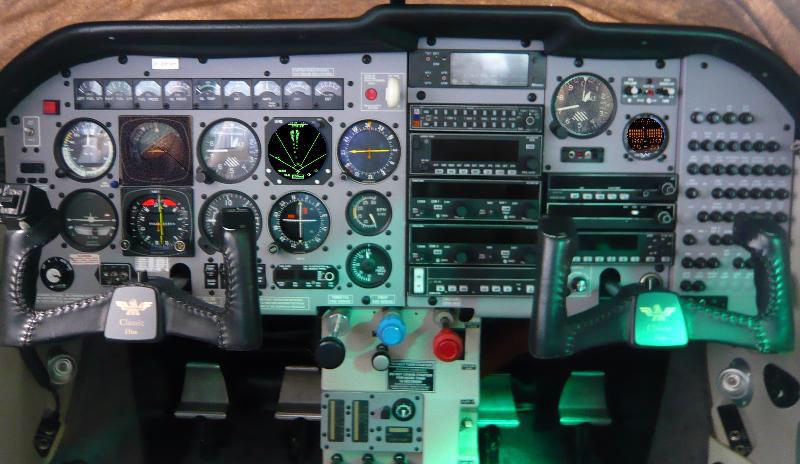
-
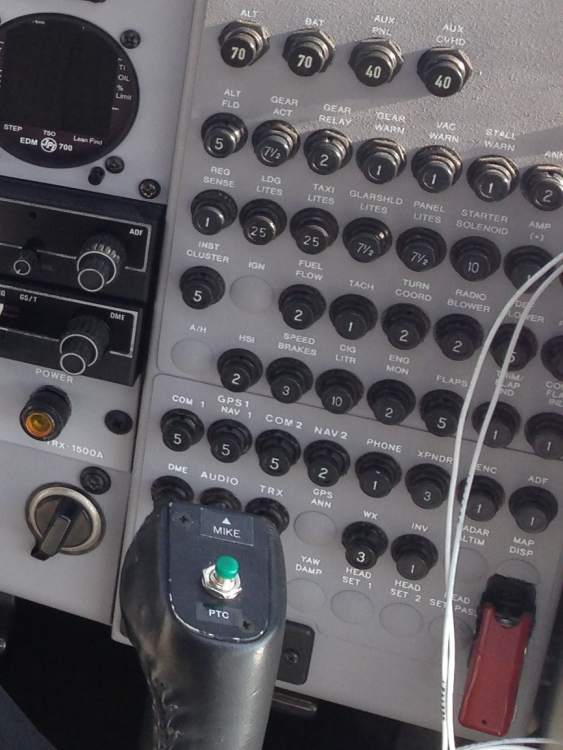
To fellow late M20J connoisseurs: I have a long time doubt regarding a non-labeled switch on the cockpit panel of a 1998 M20J Allegro (SN 24-3429), the third last J to roll out from Kevrille. On the right side of the cockpit, on the CB panel, there is a red protected switch on the lower right corner, and I am not quite sure what is this for? I was told that it is an Avionics Emergency Switch, but I don’t know if it is true... You can see the switch on the pictures in attach. This aircraft rolled out from Mooney Factory with it, but this Allegro doesn't have a 2nd battery, neither a 2nd alternator, and the Master Switch + Alternator Switch + Radio Master Switch are placed on the left side of the panel like in all modern Mooneys. I looked through the POH several times and there isn’t any reference to this red switch. And the same for the Maintenance Manual… So I ask if someone knows what is this switch, and what it does, and what should be use for? Any Allegro drivers out there that may help? Thank you in advance for your time. Cheers, Fredi

-
K-Factor for M20J with IO-360-A3B6
Costa Leite replied to pjsny78's topic in Modern Mooney Discussion
Dear ALL, This is a very old topic, but I would like to share with MS community that I had the same problem of high fuel flow readings on Shaddin Miniflo-L (S/N:8008 Software:60.01.77) on our 1998 M20J Allegro with IO-360-A3B6 (the third last J that rolled out of Kerrville). The difference from the Miniflo to the fuel pump was around 15% higher on Shaddin. After reading all the comments on this topic, I went through the Shaddin instructions and performed a flight test to turn ON the fuel pump for a couple of minutes while on cruise and didn’t notice any drop on fuel flow that could indicate an air leak on the fuel line. Then, I started the hangar work on the Shaddin and realised that the biggest difficult was to release the Shaddin from the panel because of all the wiring that goes behind the unit and around GTN750. But after a couple of attempts I was able to push back the unit and pull it under the panel, as you can see on picture in attach. Then, and first of all, I confirmed that the Shield was on the wright side, because if it wasn't it could cause "electronic noise" and high fuel flow readings, but this was not the case. Only then I started with the K-factor adjustment, and I was really surprised to see that the K-factor was set from fabric at 29.00 (as you can see also on the picture in attach) and not at 29.84 that I was expecting. I set it to 32.50 which gave a 12% change, and now we have a much more precise fuel flow readings, only with 2% safety margin from real fuel consumption. The only thing I regret is that our Miniflo-L is such an old version that cannot communicate TO the GTN750 to inform real FuelFlow to the GPS. It only receives information form GTN750 which is already very nice. If anyone have questions about adjusting K-Factor on Miniflo-L on late M20J, fell free to ask that I will be glad to help. Anyway, the Shaddin PDF shared above by Joe, and also the Miniflo Operating Manual, both give valuable information on how to master this not so difficult tuning. Cheers, Fredi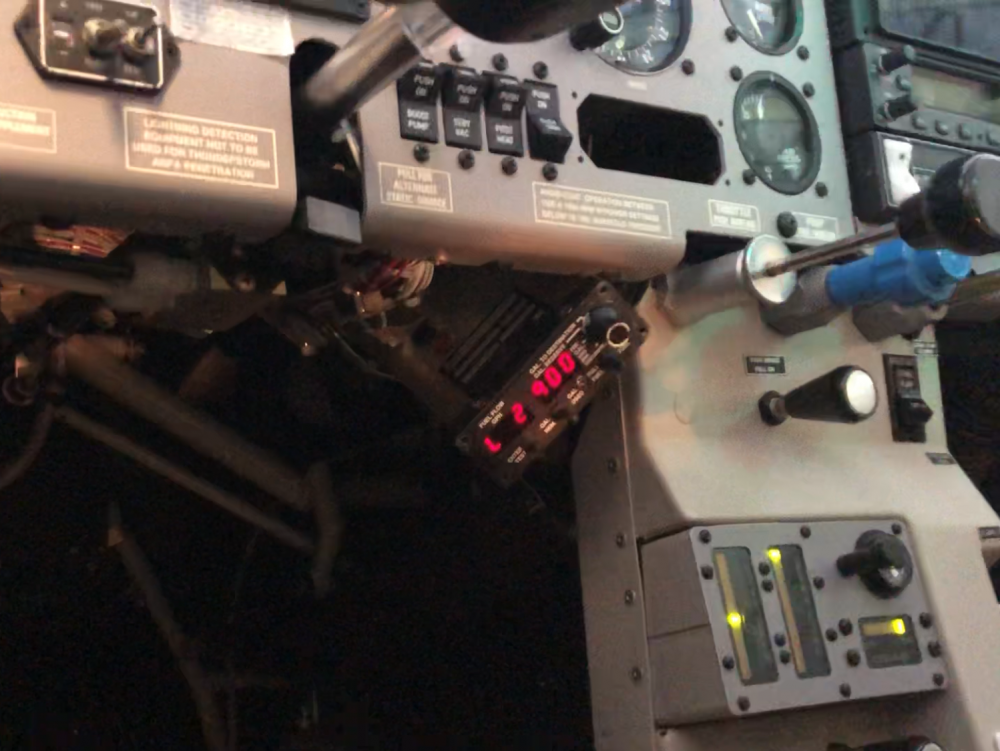
-
GTN visual approach with KFC 150
Costa Leite replied to Costa Leite's topic in Avionics/Panel Discussion
Dear all, I had a chat with Garmin Avionics Europe, and here is the reply: If the autopilot will fly an ILS without any problem, but will not fly the glideslope of any GPS approach, then this may indicate a wiring problem. There is an "ILS Energise" line from the GTN to the autopilot, which is meant to confirm that your Nav Radio is tuned to an ILS, which is what allows the autopilot to go into approach mode and fly the vertical element of an approach. The autopilot does not know about GPS approaches, so this is the only way it can allow approach mode to work. The solution to this is to connect the ILS/GPS energise pin on the GTN (Connector P1001, Pin 56) to the ILS energise pin on the autopilot. (please consult the manual of the unit/your installer for the exact pin) At the moment the connection is probably from the GTN ILS only pin (P1004, Pin 29) Once the ILS/GPS connection is made, this will trick the autopilot into thinking you are tuned to an ILS frequency when actually you are flying a GPS approach. That will allow the autopilot to go properly into approach mode and fly the vertical element of that GPS approach. Please let me know if this resolves the problem. So, it seems that Donkaye and Schinderhannes advices are correct, and I will have a look into this when possible. Many thanks to all for your help. I will post my feedback when I get this issue sorted out. -
GTN visual approach with KFC 150
Costa Leite replied to Costa Leite's topic in Avionics/Panel Discussion
Hi Carusoam When we bought GTN750, the unit came with MainSoftware V6.2. And it was already something wrong because since first day on GPS approaches we saw GS indication on HSI but he AP would not capture and fly the glide path... only the LOC. But the AP could fly ILS approaches fully coupled with LOC and GS. After the recent GTN SoftwareUpgrade to V6.70, the problem persist, and it is also noticeable on “GTN Visual Approaches” which are GPS approaches self computed by GTN with GP output, that is clearly visible on HSI as well, but the AP cannot fly it, although it can still fly fully coupled an GS of an ILS approach. -
GTN visual approach with KFC 150
Costa Leite replied to Costa Leite's topic in Avionics/Panel Discussion
Thanks Warren and Schinderhannes for your comments. I am precisely looking for thins kind of information / advice. I confirm that the AP can fly correctly ILS approaches and follow the GS. But cannot fly the GS of GPS approaches with vertical guidance. This already happened before the recent GTN software upgrade, but now after the software upgrade it is more noticeable because the AP cannot fly the GPS Visual Approaches and it should! It is really strange that the AP can fly ILS approaches and capture the ILS GS, but cannot fly the GS of a GPS approach even that the GS is correctly shown on HSI KI-525A... As far as I can understand, the wiring from GTN to HSI should be OK because the HSI shows the GS on both GPS and ILS approaches. On the other hand the wiring from HSI to AP should be OK for ILS but not for GPS... or maybe it’s correct and It is the wiring from GTN to AP that is wrong..? I don’t even know if there is any wiring direct from GTN to AP...!? -
GTN visual approach with KFC 150
Costa Leite replied to Costa Leite's topic in Avionics/Panel Discussion
Ok. Thanks for the advice Donkaye. I will let this maintenance for our avionics guy. But it is real strange that the KFC150 captures the LOC&GS of an ILS but not of an GPS Approach. So I guess the missed wiring is only about GPS wire, right? -
GTN visual approach with KFC 150
Costa Leite replied to Costa Leite's topic in Avionics/Panel Discussion
Many thanks to all comments on this topic. I updated the GTN software last week and already tried the visual approach a few times, but our KFC150 only capture the CDI and not the VDI even though I see the VDI on the HSI. I am aware of the necessity to fly through the glideslope slightly, from above or below, for the AP to capture the VDI, but I couldn’t fly the approach with AP engaged on APP mode through the GS like on an ILS at any of the trials. As I have the same problem when trying others GPS RNP oficial approaches, I am thinking that maybe our wiring is wrong... Donkaie, can you please be more specific of this wiring problem? Were is this wiring option? At he GTN or at HSI? Any pictures or diagram to share about this? Is this a simple wiring change that I can do by my own, or does it need any configuration on the GTN to be changed? -
GTN visual approach with KFC 150
Costa Leite replied to Costa Leite's topic in Avionics/Panel Discussion
Many thanks Donkaye for the explanation! I will trace this up and post the follow up. On next week I schedule the GTN Software Upgrade and I will be able to check everything. -
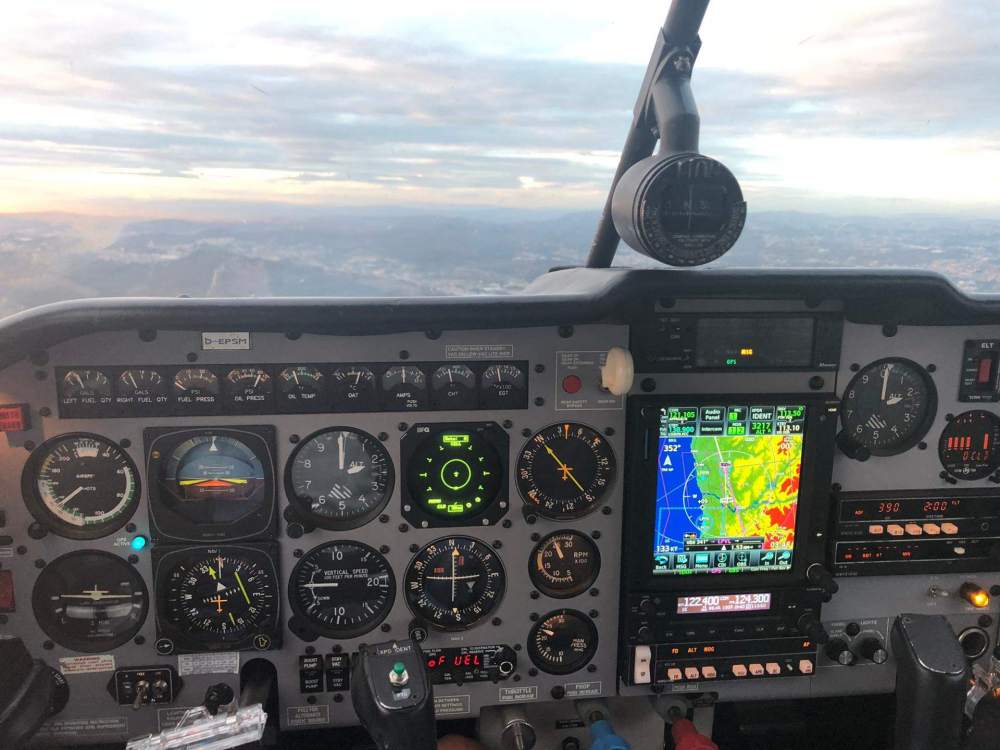
Dear all, On our M20J Allegro we have upgraded the panel to a GTN750 in 2017, but we kept all original KFC 150 system: ADI KI-256 & HSI KI-525A & APcomputer KC-192. We don’t have any GPSS unit neither ALT pre-select KAS-297B. Our GTN750 still has the MainSoftware V6.2 that came with the unit but now we would like to go for the GTN SoftwareUpgrade V6.70 in order to benefit from the last functions like Visual Approach, Vnav, etc. But I am not totally sure if the GTN will send GS information to the KFC150 from the 3°glide path of VisualApp? Does anyone have this configuration and already tried the GTN VisualApproach with KFC150? Do the Autopilot fly the glide path on APP mode? So far, on our Allegro with the GTN V6.2, while on RNP Approaches, the KFC receives the GP information and shows it on HSI GS and on ADI FD, but the AP will only fly the Localizer and we need to command the descent with the Up/Down switch. Can anyone share its knowledge on this? Anyway, I think we will move forward with the upgrade and post here the feedback afterwards. Cheers, Fredi (the picture below is from our panel to only show the current configuration GTN & KFC150)